



Choosing the right dehumidifier for your basement isn't just about picking the most powerful unit on the market. It requires understanding your space, moisture levels, and specific needs to ensure optimal performance and energy efficiency. This comprehensive guide will help you determine the perfect dehumidifier size and settings for your basement.
Understanding Basement Humidity Challenges
Basements are naturally prone to moisture problems due to their below-grade location. Ground moisture can seep through foundation walls and floors, while poor ventilation traps humid air. Without proper moisture control, basements become breeding grounds for mold, mildew, and harmful pests, potentially damaging your home's structure and stored belongings.
Excess moisture creates unpleasant musty odors, causes wood rot, damages home fixtures, and can lead to serious health issues. This is why selecting an appropriately sized dehumidifier with the right features is crucial for maintaining a healthy, dry basement environment.
What Size Dehumidifier Do You Need for Your Basement?
Calculating Your Basement's Square Footage
The first step in choosing the right dehumidifier is accurately measuring your basement. Multiply the length by the width of your space to get the total square footage. For irregularly shaped basements, break the area into rectangles, calculate each section separately, and add them together.
Understanding Dehumidifier Capacity Ratings
Dehumidifiers are rated by their moisture removal capacity, measured in pints per day (PPD). However, there are two key ratings you should understand:
AHAM Rating (Association of Home Appliance Manufacturers): This standardized rating measures performance at 80°F and 60% relative humidity, representing typical indoor conditions.
Saturation Rating: This measures maximum capacity at 90°F and 90% relative humidity, showing the unit's full potential under extreme conditions.
For accurate comparison and sizing, always refer to the AHAM rating, as it reflects real-world performance in your basement.
Sizing Guidelines by Square Footage
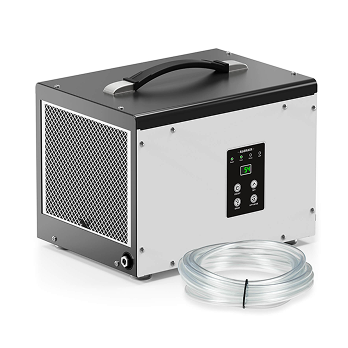
For 1,000 Square Feet: A 70 PPD dehumidifier (35 PPD AHAM rating) effectively handles basements up to 1,000 square feet. The Sentinel HD35P is specifically designed for this size range, featuring a compact design measuring 15.35" x 11.2" x 11.4" that fits easily into tight basement corners while still delivering powerful moisture removal.
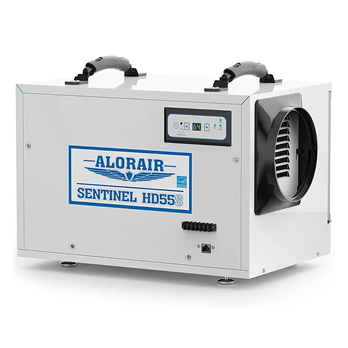
For 1,200-1,300 Square Feet: Spaces in this range benefit from 113-120 PPD units (55-60 PPD AHAM rating). The Sentinel HD55 series, including both the standard and WiFi-enabled HD55S models, are engineered for basements up to 1,300 square feet, providing reliable moisture control with modern smart features.
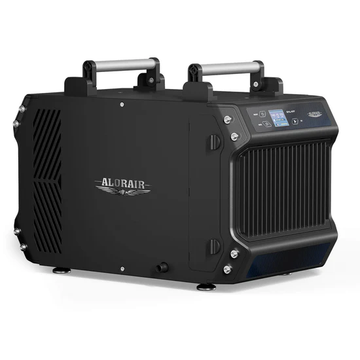
For 1,800-2,300 Square Feet: Medium to large basements require 145-180 PPD capacity. The Galaxy 85P, rated at 180 PPD at saturation, covers up to 2,300 square feet, making it ideal for larger residential basements or multi-purpose spaces. Similarly, the Sentinel WHD-100 whole house dehumidifier removes 90 pints per day and efficiently handles up to 2,300 square feet.
For 2,600 Square Feet and Larger: Extra-large basements need industrial-grade capacity. The Sentinel HDI90 delivers 198 PPD at saturation (90 PPD AHAM), covering up to 2,600 square feet. For even larger spaces up to 3,000-4,500 square feet, whole house dehumidifiers like the WHD-120, WHD-150, and WHD-200 provide 104-165 pints per day of moisture removal.
Adjusting for Moisture Severity
Square footage alone doesn't tell the complete story. You must also consider your basement's moisture level:
Moderately Damp Basements: If your basement feels damp and has occasional musty odors during humid seasons, standard sizing based on square footage works well.
Very Damp Basements: If you notice visible moisture on walls, persistent musty odors, or damp spots, increase capacity by 25-30%. For a 1,000-square-foot moderately damp basement that needs a 70 PPD unit, upgrade to a 120 PPD model for very damp conditions.
Wet Basements: Basements with standing water, seepage, or visible water damage require more intensive moisture control. When choosing a basement dehumidifier for these conditions, consider a unit at the higher end of the recommended capacity range or move up to the next size category. However, standing water and active leaks should be corrected before relying on a dehumidifier for ongoing humidity management.
Temperature Considerations: Basements typically run cooler than main living areas. Ensure your dehumidifier has auto-defrost functionality to prevent frost buildup in temperatures down to 33-36°F. All AlorAir Sentinel and Galaxy series units feature advanced auto-defrosting systems with built-in sensors that monitor ambient temperature and automatically initiate defrost cycles when needed.
Essential Features for Basement Dehumidifiers

Built-in Pump vs. Gravity Drainage
Gravity Drainage: This requires the dehumidifier to be positioned higher than the drain point, allowing water to flow naturally through a hose. While simple and reliable, it limits placement options.
Pump Drainage: Units with built-in pumps, like the Sentinel HD35P, Galaxy 85P, and Sentinel HDI90, can pump water sideways or vertically up to 19.6 feet away. This flexibility allows you to place the dehumidifier anywhere in your basement, even if the nearest drain is across the room or higher than the unit itself.
For basements without floor drains or where the drain is distant, a pump-equipped model is essential for continuous, hands-free operation.
Automatic Defrost Systems
Basements maintain cooler temperatures year-round, especially in winter. Without auto-defrost, ice can form on the coils, reducing efficiency and potentially damaging the unit.
Modern auto-defrosting systems continuously monitor temperature using built-in sensors. When low temperatures are detected, the compressor temporarily stops while the fan continues operating, allowing frost to thaw naturally. Once the defrost cycle completes, the dehumidifier resumes normal operation. This feature conserves energy, prevents damage, and extends the unit's lifespan.
Internal Corrosion Protection
Basement air often contains oxide, hydroxide, and sulfide compounds that accelerate corrosion on standard coils, leading to freon leakage and system failure. Advanced internal corrosion protection technology, found in AlorAir's Sentinel and Galaxy series, extends coil life by providing protection against these corrosive elements while maintaining optimal heat transferability.
This feature is particularly important for basements with higher moisture levels or those used for storage where air circulation may be limited.
Air Filtration Systems
A MERV-1 filter protects internal components from dust damage, which is especially important in basements that may contain construction dust, pet dander, or stored items that generate particulates. These filters should be replaced every 3-6 months depending on usage and basement conditions.
Some models offer optional MERV-8 filters for enhanced air purification, capturing smaller particles and improving overall air quality.
Smart WiFi Controls
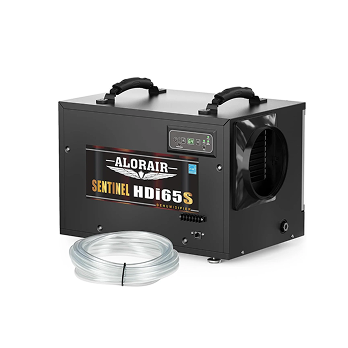
WiFi-enabled dehumidifiers like the Sentinel HD55S and HDI65S allow you to monitor and control your basement's humidity levels remotely through a free smartphone app. You can check real-time humidity readings, adjust settings, track performance trends, and receive alerts from anywhere, ensuring consistent moisture control even when you're away from home.
This is particularly valuable for vacation homes, rental properties, or simply for peace of mind knowing your basement stays protected 24/7.
Energy Efficiency Ratings
Energy Star certified dehumidifiers deliver significant savings on energy bills without sacrificing performance. Look for units with high COP (Coefficient of Performance) ratings, which measure efficiency. The Sentinel HDI90, for example, features a 2.69 L/KWh COP rating, representing excellent energy efficiency at the lowest running cost.
Over months and years of continuous operation, these efficiency gains translate to substantial energy savings while still providing powerful moisture removal.
What Should a Dehumidifier Be Set At in a Basement?

Optimal Humidity Range
The ideal relative humidity (RH) level for basements is between 30-50%, with most experts recommending a target of 40-45% RH. This range prevents mold growth, protects stored items, eliminates musty odors, and creates a comfortable environment.
Below 30% RH, air becomes too dry, potentially causing wood to crack and creating uncomfortable conditions. Above 60% RH, mold and mildew can begin to develop, and dust mites thrive.
Seasonal Adjustments
Summer Settings: During humid summer months, set your dehumidifier to maintain 40-45% RH. The unit will run more frequently to combat higher outdoor humidity and moisture infiltration.
Winter Settings: In winter, basements naturally become drier as cold air holds less moisture. You may raise the set point to 45-50% RH, or your dehumidifier may run less frequently while still maintaining target levels.
Spring and Fall: Shoulder seasons with fluctuating temperatures require closer monitoring. Start at 40–45% RH and adjust the setting based on humidity readings and comfort levels.
During these transitional periods, the runtime of a dehumidifier can vary significantly depending on seasonal moisture levels, unit capacity, and humidistat settings. Understanding these variables is important when evaluating how long a crawl space dehumidifier should run. In general, a newly installed unit may run almost continuously during the initial drying phase, while a properly sized system will begin cycling on and off once the target humidity is consistently maintained.
Using Continuous Mode Strategically
Most basement dehumidifiers offer a continuous mode that runs non-stop, removing moisture regardless of humidity levels. This mode is useful for:
- Initial drying after water damage or flooding
- Extremely humid conditions following heavy rain
- First-time use in a previously uncontrolled basement
- Storage areas with minimal air circulation
However, continuous mode consumes more energy and may over-dry your space. Once humidity reaches target levels, switch to automatic mode where the unit cycles on and off to maintain your set point.
Monitoring and Adjusting
Many modern dehumidifiers feature real-time humidity displays showing current basement conditions. Monitor these readings for several weeks to understand your basement's natural humidity patterns.
If you consistently see readings above 60% even with the dehumidifier running, you may need a larger capacity unit or should investigate the moisture source (foundation leaks, poor ventilation, etc.).
If readings consistently stay below 35%, you can raise your set point slightly or allow the unit to run less frequently.
Additional Installation and Placement Tips
Optimal Positioning
Place your dehumidifier in a central location with adequate clearance on all sides for proper airflow. Most units require at least 12 inches of clearance around the unit. Avoid corners and tight spaces that restrict air circulation.
Keep the unit away from walls and furniture that could block air intake or output vents. For maximum effectiveness, position the dehumidifier near the dampest area of your basement while still maintaining good air circulation.
Using Dehumidifier Risers
Dehumidifier risers or boosters elevate the unit 3-4 inches off the floor, improving airflow underneath and around the unit. Heavy-duty risers supporting up to 1,500 pounds accommodate even the largest commercial-grade dehumidifiers while providing better air circulation and making it easier to route drain hoses.
This elevation also protects your dehumidifier from minor flooding events and makes it easier to clean around and under the unit.
Ducting for Whole House Systems
For larger basements or multi-room moisture control, whole house dehumidifiers like the Sentinel WHD series offer DIY adjustable inlet and outlet configurations. You can select forward air/rear air or forward air/up air configurations, rotating and adjusting to meet various scenarios.
These systems can connect through ductwork to dehumidify multiple rooms simultaneously, or operate in series/parallel with other ventilation equipment for efficient dehumidification. This is especially valuable for large areas where traditional dehumidifiers cannot meet requirements on their own.
Combining Dehumidifiers with Ventilation
For comprehensive moisture control, consider pairing your basement dehumidifier with a ventilation fan. Dehumidifier and ventilator combo packages provide complete environmental control by:
- Removing excess moisture from the air
- Introducing fresh outdoor air when conditions permit
- Exhausting stale, humid air to the exterior
- Creating positive air circulation throughout the basement
Ventilation fans rated between 260-780 CFM (cubic feet per minute) can work alongside dehumidifiers to maintain more stable conditions. This combined approach is particularly effective in basements used as living spaces, workshops, or storage areas where air quality matters as much as humidity control.
Ventilation and dehumidification are only part of a complete moisture-control plan. Other practical ways to keep a basement dry include sealing foundation cracks, extending downspouts away from the house, improving exterior grading, insulating condensation-prone pipes, and repairing plumbing leaks. Reducing moisture at its source lowers the dehumidifier’s workload and can decrease energy consumption.
Maintenance Best Practices
Regular Filter Changes
Replace or clean your MERV-1 filter every 3-6 months, or more frequently in dusty conditions. A clogged filter reduces airflow, decreases efficiency, and forces the unit to work harder, increasing energy consumption.
Mark your calendar or set smartphone reminders to check filters regularly. Some WiFi-enabled models can send maintenance reminders automatically.
Drain Hose Inspection
Check drain hoses periodically for kinks, clogs, or disconnections. Even with pump drainage, debris can occasionally block the hose, causing the unit to shut down or overflow.
Ensure hoses are properly secured and routed to prevent water backup. For gravity drainage systems, verify the hose maintains a consistent downward slope to the drain point.
Coil Cleaning
Once or twice per year, inspect the coils for dust buildup. While filters protect the coils, some fine dust may accumulate over time. Gently vacuum or wipe the coils according to manufacturer instructions to maintain optimal heat transfer and efficiency.
Annual Professional Inspection
Consider having a qualified technician inspect your dehumidifier annually, especially for larger commercial-grade units. Professional service can identify potential issues before they become serious problems, extending the life of your investment.
When to Consider Professional Assessment
If your properly sized and maintained dehumidifier struggles to maintain target humidity levels, you may have underlying moisture issues requiring professional attention:
- Foundation cracks allowing water infiltration
- Poor exterior drainage directing water toward the foundation
- Inadequate basement waterproofing
- High water table causing hydrostatic pressure
- Plumbing leaks within the basement
Addressing these root causes improves your dehumidifier's effectiveness and protects your home's structural integrity.
Conclusion
Selecting the right dehumidifier size and settings for your basement requires considering square footage, moisture severity, temperature range, and desired features. By understanding these factors and following proper maintenance practices, you'll create a healthy, comfortable basement environment that protects your home and belongings.
Remember these key takeaways:
- Size your dehumidifier based on square footage and moisture severity
- Choose a unit with auto-defrost for basement temperatures
- Opt for pump drainage if floor drains are distant or non-existent
- Set humidity to 40-45% RH for optimal protection
- Maintain filters and drain systems regularly
- Consider WiFi-enabled models for remote monitoring and control
With the right equipment properly sized and configured for your specific needs, your basement will remain dry, odor-free, and protected from moisture damage year-round.


